

How It Works
The full workflow, step by step.
Market Post Pro is designed around how dealership reps actually work. Here's exactly what happens from the moment you open a vehicle page to the moment your listing is live on Facebook Marketplace.
Install the Chrome extension
Market Post Pro runs as a Chrome extension. Once your account is approved, you install it from the Chrome Web Store in under a minute. No configuration, no IT involvement, no integration with your DMS.
- Install from Chrome Web Store
- Sign in with your Google account
- Extension appears as a side panel icon in Chrome
- Ready to use immediately on any dealer website
Open a vehicle page and click Scrape
Navigate to any vehicle on your dealership's inventory website - the same page you'd normally open to check details. Click the Market Post Pro icon to open the side panel, then click Scrape This Vehicle.
- Works on any dealership inventory website
- No special page setup or URL format required
- Pulls year, make, model, trim, price, mileage, colours, VIN, and more
- Vehicle details appear in the side panel in under 3 seconds
Review the scraped details
All extracted vehicle details appear in the side panel. You can review every field, make edits if needed, and confirm everything looks right before posting. Nothing gets posted without your review.
- All fields are editable before posting
- Photos are shown as thumbnails - deselect any you don't want
- VIN is extracted and verified automatically
- Pricing, mileage, and colours are pulled from the live page
Generate a listing description
Click Generate Description to create a natural-sounding, listing-ready vehicle description using AI. The description is based on the actual vehicle details - not a template. You can edit it, regenerate it, or skip this step entirely.
- One click generates a complete description
- Uses real vehicle details, not generic templates
- Reads naturally - not robotic or repetitive
- Fully editable before posting
Click Post to Facebook Marketplace
Click Post to Facebook. The extension opens Facebook Marketplace in a new tab, navigates to the vehicle listing form, and fills every field automatically - including uploading all photos. You review the completed form and hit Publish.
- All 16 Marketplace fields filled automatically
- Photos uploaded directly - no downloading required
- Facebook won't flag it as automation - it works exactly like a real user would
- You review and publish - nothing is submitted without you
Listing is tracked in your dashboard
Once posted, the listing is saved in your Market Post Pro dashboard. You can see when it was posted, when it expires, and when it needs to be relisted. Managers see all rep activity in real time.
- Listing saved with post date and expiry tracking
- Relist reminders when listings approach expiry
- Managers see all team activity in the manager portal
- Full pipeline: scraped → posted → sold
See it in action
What it looks like at each step.
Real screenshots from active dealership workflows.
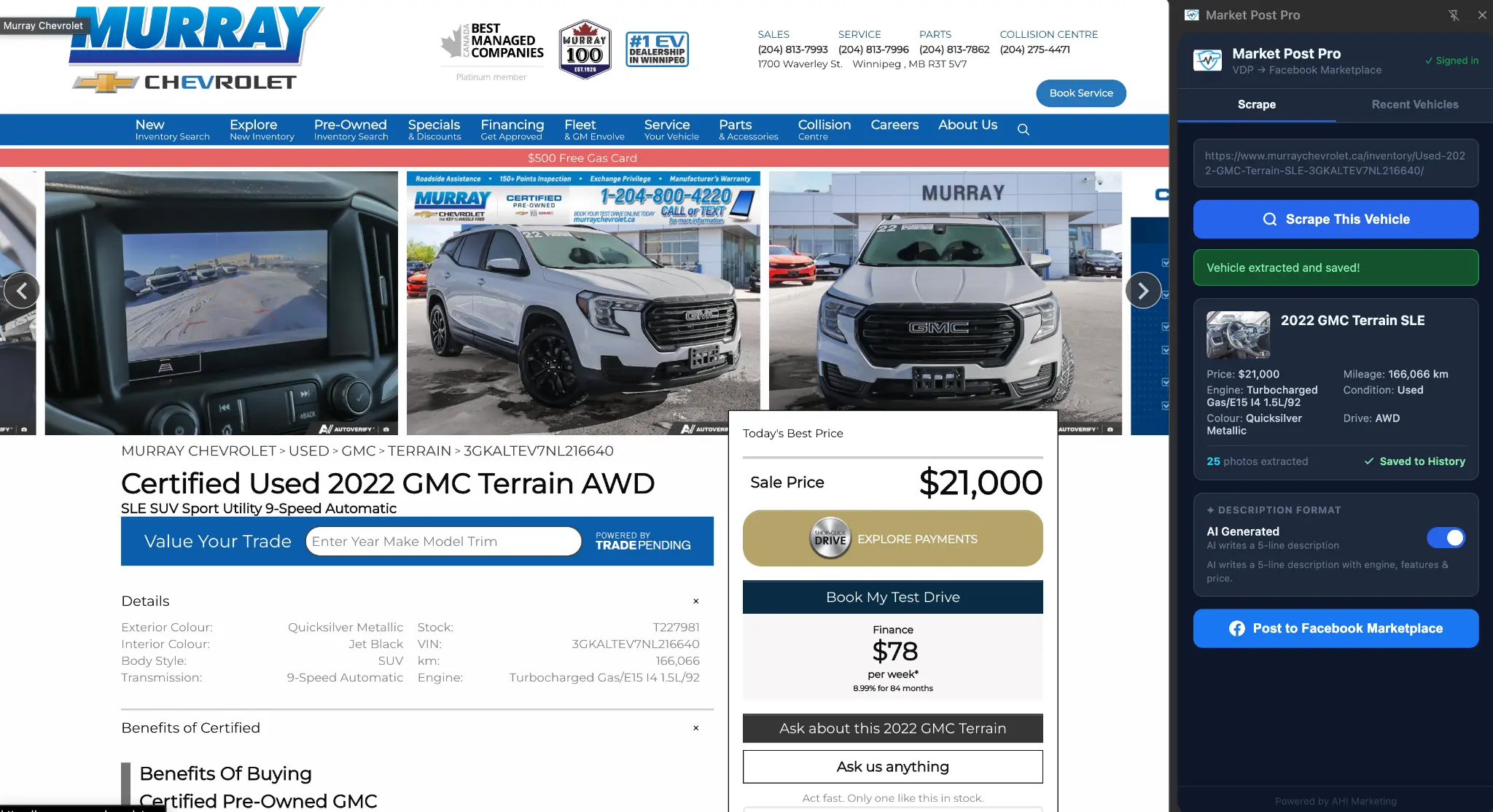
Steps 01-03: Scrape and review
Open any vehicle page, click Scrape, and all details appear in the side panel in under 3 seconds.
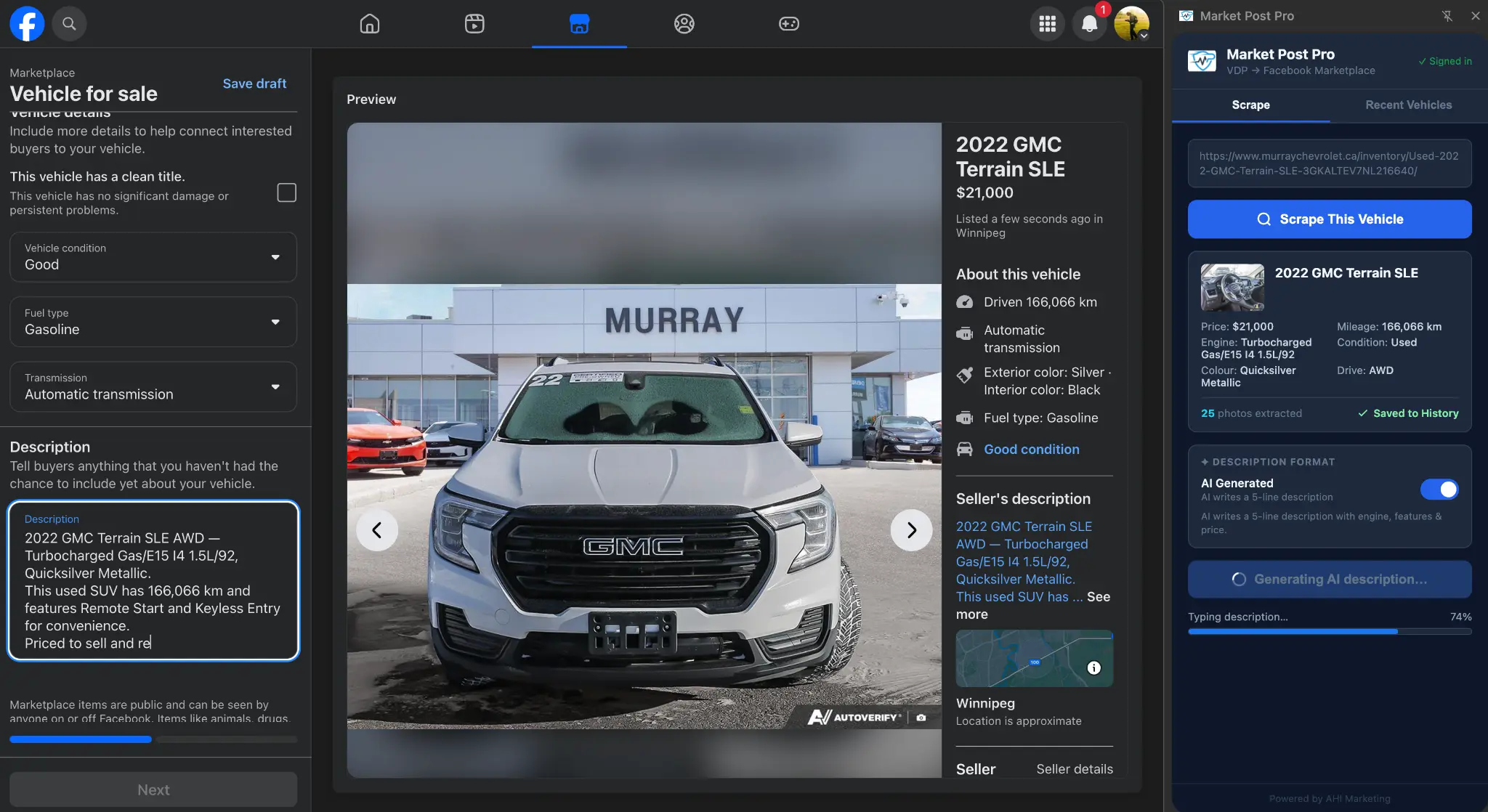
Step 05: Post to Facebook Marketplace
Every field filled automatically. AI description typing in real time. You review the completed form and hit Publish.
The whole process takes under 90 seconds.
From opening the vehicle page to a live Facebook Marketplace listing.
Want to see it on your inventory?
Book a demo and we'll walk through the workflow using your own dealership's vehicle pages - no slides, no generic demo data.
Book a Demo